Tangibl Case Study
Making a first tokenised-asset purchase feel safeBuyers dropped out because they couldn't tell what a wallet was for, what they'd own, or whether a payment worked. Three test rounds and a holdout beta took first-purchase success from 6/12 to 11/12.
UX/UI · User flows · Information architecture · Prototyping · Visual design
UX/UI · User flows · Information architecture · Prototyping · Visual design

Problem and constraints
Goal: get a first-time user from sign-up to first purchase unaided before public beta. Users: collectors new to crypto, and experienced traders who expect depth. Constraints: KYC before first purchase; third-party wallet screens can't be restyled; fixed launch date; one designer.
Design question: How might we make a blockchain ownership model feel as safe as a normal checkout without hiding what a buyer needs to know?
"I clicked connect and froze. I thought it was going to take my money."
P3, crypto-new collector

Discovery
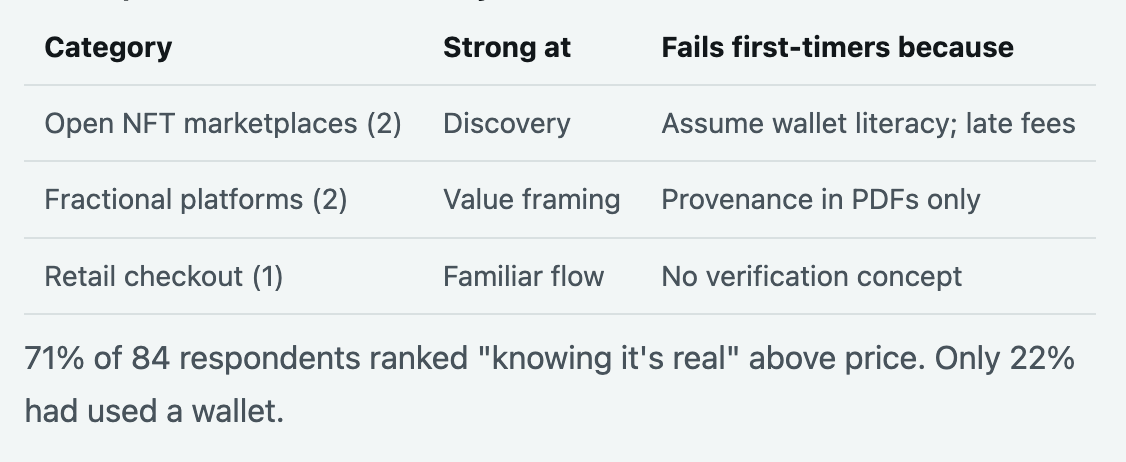
6 interviews (3 crypto-new, 3 experienced), an 84-person survey, and an audit of 5 products. 140 interview notes were clustered into themes.
Strategy
I mapped the product to five buyer questions and gave each one an owned section: What is it? Can I trust it? Where has it been? What am I buying? What is it worth?

Influence: the fee-display disagreement
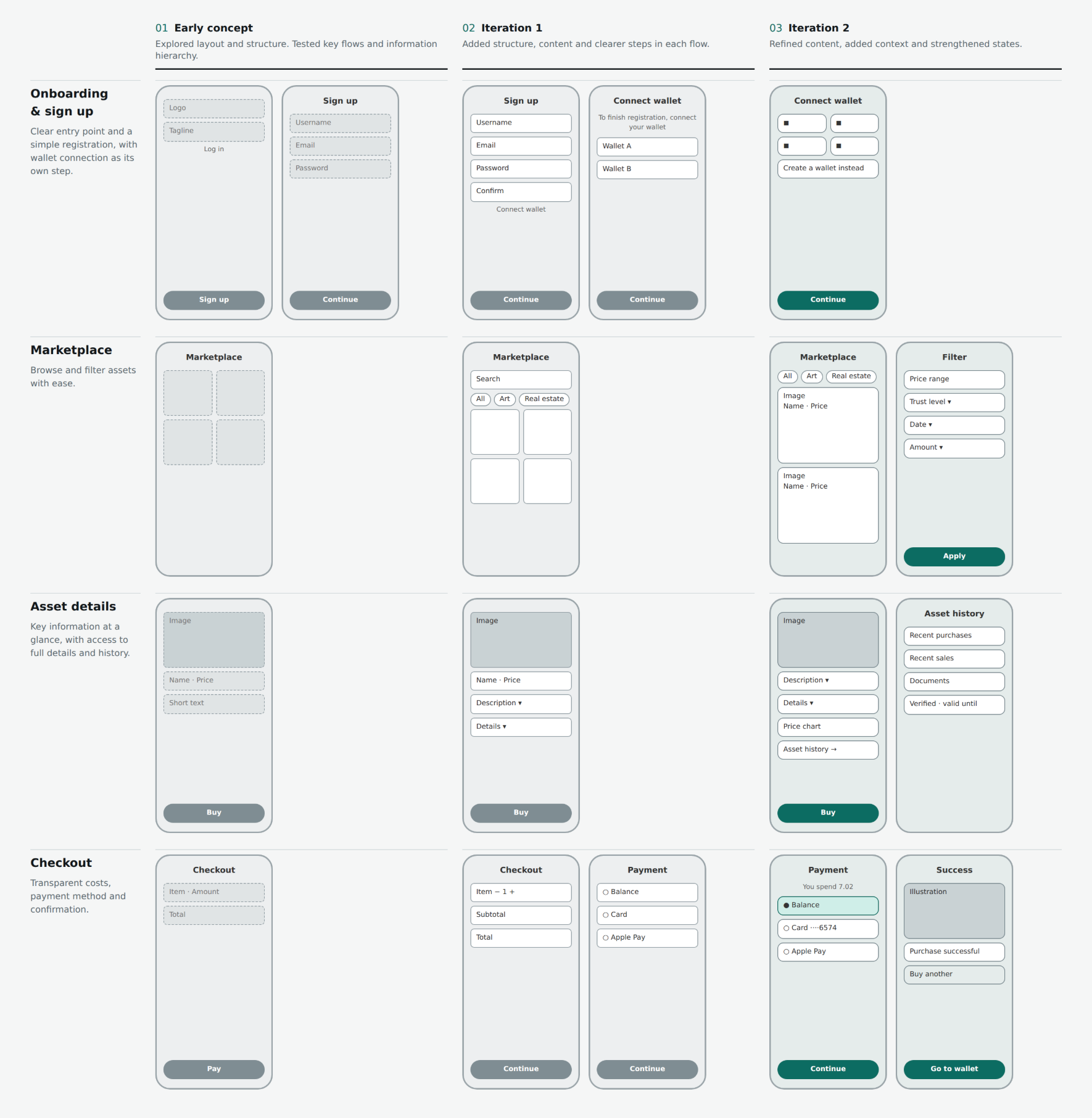
Week 6, the PM wanted fees shown only on the final screen to protect the launch date and conversion. Engineering also couldn't give exact network fees early. I built two prototype variants and ran 6 quick sessions: 4 of 6 said the late-fee version felt "like a trap". I took that, plus a compliance note on fee-disclosure risk, to the PM and engineers. We agreed a compromise: a labelled estimated total on the asset page, exact fee on confirm, with engineering adding a fee estimate endpoint in the same sprint. I cut my own preferred full-breakdown idea to meet the date.
Testing across three rounds
Moderated tasks on a clickable prototype. R1 and R2: 12 participants each (8 crypto-new, 4 experienced), different people each round. R3: 6 participants, targeted at the two problem areas. Success meant no moderator help.

Asset Details
The asset page became the decision-making layer
Rather than separating important information across multiple areas, the asset detail experience brings the information users need to evaluate a purchase into one place.
What is it?
Description and asset overview
Can I trust it?
Verification and provenance
Where has it been?
Asset history and ownership
What exactly am I buying?
Token and asset details
What is it worth?
Evaluation and price dynamics
Study Overview
8
Participants
2 Rounds
Baseline and revised prototype
4
Core user journeys
Task-based
Usability evaluation
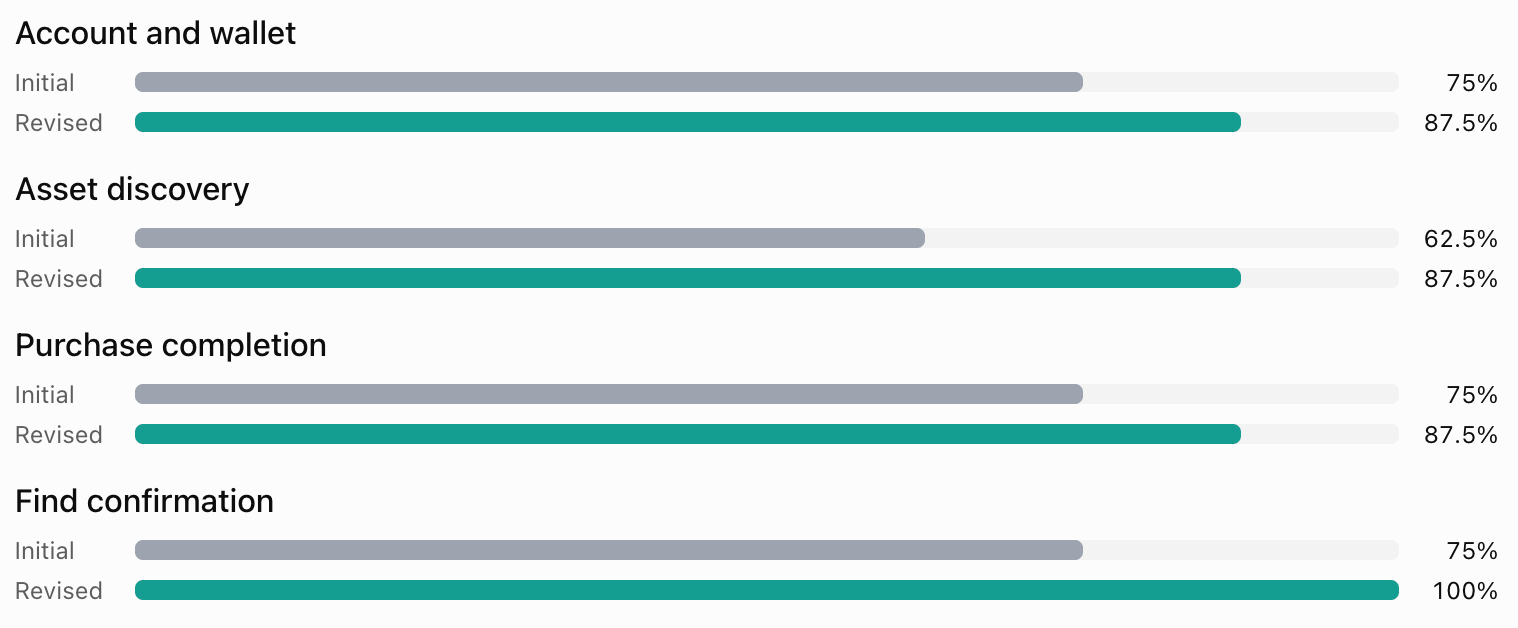
Objective: Identify friction across the journey from creating an account to purchasing and accessing a tokenised asset.
Method: Participants complete realistic tasks using the initial prototype, followed by a revised version. Observe task completion, navigation choices, hesitation, errors and requests for assistance.
Evaluation criteria: A task counts as successful only when the participant reaches the intended outcome without moderator assistance.
Results overview
Findings and design decisions
1. Wallet connection lacked context
Observation: 3 of 8 participants were unsure why a wallet was needed or whether connecting it would trigger a transaction.
Design response: Added explanatory microcopy, clarified wallet connection versus purchase authorisation, and made the primary action clearer.
2. Asset discovery lacked clarity
Observation: 4 of 8 participants struggled to find relevant assets due to low filter visibility and inconsistent information across cards.
Design response: Improved search and filter visibility, standardised card layouts, and prioritised price, asset type and key metadata.
3. Asset details hindered decision-making
Observation: Participants struggled to distinguish current prices from historical data, with supporting information scattered across the page.
Design response: Prioritised the current price and purchase action, clarified chart labels, and grouped asset information into scannable sections.
4. Purchase confirmation lacked clarity
Observation: 2 of 8 participants were unsure whether their purchase had completed or required further action.
Design response: Introduced a clearer success state, purchase summary and transaction status, with a direct route to the acquired asset and transaction record.